Loading...
Searching...
No Matches
CameraSettingsBlueDevice Class Reference
A base class for camera related settings belonging to the mvBlueXXX-series (Device specific interface layout only). More...
Inheritance diagram for CameraSettingsBlueDevice:
Public Member Functions | |
| __init__ (self, *args) | |
| Constructs a new mvIMPACT.acquire.CameraSettingsBlueDevice object. | |
| getAutoControlParameters (self) | |
| Provides access to the control parameters for AGC and AEC. | |
| hObj (self) | |
| Returns a unique identifier for the component collection referenced by this object. | |
| restoreDefault (self) | |
| Restores the default for every component of this collection. | |
Properties | |
| aoiHeight = property(lib_mvIMPACT_acquire.BasicDeviceSettingsWithAOI_aoiHeight_get, doc=) | |
| An integer property defining the number of lines to capture. | |
| aoiStartX = property(lib_mvIMPACT_acquire.BasicDeviceSettingsWithAOI_aoiStartX_get, doc=) | |
| An integer property defining the X-offset for each capture line. | |
| aoiStartY = property(lib_mvIMPACT_acquire.BasicDeviceSettingsWithAOI_aoiStartY_get, doc=) | |
| An integer property defining the Y-offset. | |
| aoiWidth = property(lib_mvIMPACT_acquire.BasicDeviceSettingsWithAOI_aoiWidth_get, doc=) | |
| An integer property defining the number of pixels to capture per line. | |
| autoControlMode = property(lib_mvIMPACT_acquire.CameraSettingsBlueDevice_autoControlMode_get, doc=) | |
| An enumerated integer property defining the auto control mode the device is operated in. | |
| autoControlParameters = property(lib_mvIMPACT_acquire.CameraSettingsBlueDevice_autoControlParameters_get, doc=) | |
| Provides access to the control parameters for AGC and AEC. | |
| autoExposeControl = property(lib_mvIMPACT_acquire.CameraSettingsBlueDevice_autoExposeControl_get, doc=) | |
| An enumerated integer property, which represents the current mode the AEC (A utomatic E xpose C ontrol) is operated in. | |
| autoGainControl = property(lib_mvIMPACT_acquire.CameraSettingsBlueDevice_autoGainControl_get, doc=) | |
| An enumerated integer property, which represents the current mode the AGC (A utomatic G ain C ontrol) is operated in. | |
| basedOn = property(lib_mvIMPACT_acquire.BasicDeviceSettings_basedOn_get, doc=) | |
| A string property (read-only) containing the name of the setting this setting is based on. | |
| binningMode = property(lib_mvIMPACT_acquire.CameraSettingsBlueDevice_binningMode_get, doc=) | |
| An enumerated integer property defining the binning mode the camera is operated in. | |
| expose_us = property(lib_mvIMPACT_acquire.CameraSettingsBlueDevice_expose_us_get, doc=) | |
| An integer property which defines the exposure time for an image in us. | |
| exposeMode = property(lib_mvIMPACT_acquire.CameraSettingsBlueDevice_exposeMode_get, doc=) | |
| An enumerated integer property defining the exposure mode the camera sensor is operated in. | |
| frameDelay_us = property(lib_mvIMPACT_acquire.CameraSettingsBlueDevice_frameDelay_us_get, doc=) | |
| An integer property defining the delay in us between an external trigger event an the begin of the sensor exposure. | |
| gain_dB = property(lib_mvIMPACT_acquire.CameraSettingsBlueDevice_gain_dB_get, doc=) | |
| A float property defining the gain in dB. | |
| imageRequestTimeout_ms = property(lib_mvIMPACT_acquire.BasicDeviceSettings_imageRequestTimeout_ms_get, doc=) | |
| An integer property defining the maximum time to wait for an image in ms. | |
| offset_pc = property(lib_mvIMPACT_acquire.CameraSettingsBlueDevice_offset_pc_get, doc=) | |
| A float property defining the analogue sensor offset in percent of the allowed range (sensor specific). | |
| pixelClock_KHz = property(lib_mvIMPACT_acquire.CameraSettingsBlueDevice_pixelClock_KHz_get, doc=) | |
| An enumerated integer property defining the pixel clock of the camera sensor in KHz. | |
| pixelFormat = property(lib_mvIMPACT_acquire.CameraSettingsBase_pixelFormat_get, doc=) | |
| An enumerated integer property defining the pixel format used to transfer the image data into the target systems host memory. | |
| testMode = property(lib_mvIMPACT_acquire.CameraSettingsBlueDevice_testMode_get, doc=) | |
| An enumerated integer property defining the image transmission mode of the camera. | |
| thisown = property(lambda x: x.this.own(), lambda x, v: x.this.own(v), doc="The membership flag") | |
| triggerMode = property(lib_mvIMPACT_acquire.CameraSettingsBlueDevice_triggerMode_get, doc=) | |
| An enumerated integer property which defines what kind of trigger mode shall be used for an image acquisition. | |
Detailed Description
A base class for camera related settings belonging to the mvBlueXXX-series (Device specific interface layout only).
- Note
- This class will only be available if mvIMPACT.acquire.Device.interfaceLayout is set to mvIMPACT.acquire.dilDeviceSpecific before the device is opened.
Constructor & Destructor Documentation
◆ __init__()
| __init__ | ( | self, | |
| * | args ) |
Constructs a new mvIMPACT.acquire.CameraSettingsBlueDevice object.
- Parameters
-
pDev [in] A pointer to a mvIMPACT.acquire.Device object obtained from a mvIMPACT.acquire.DeviceManager object. settingName [in] The name of the driver internal setting to access with this instance. A list of valid setting names can be obtained by a call to mvIMPACT.acquire.FunctionInterface.getAvailableSettings, new settings can be created with the function mvIMPACT.acquire.FunctionInterface.createSetting
Member Function Documentation
◆ getAutoControlParameters()
| getAutoControlParameters | ( | self | ) |
Provides access to the control parameters for AGC and AEC.
- Note
- These settings will only affect the image if mvIMPACT.acquire.CameraSettingsBlueDevice.autoGainControl, mvIMPACT.acquire.CameraSettingsBlueDevice.autoExposeControl or both are set to active.
◆ hObj()
|
inherited |
Returns a unique identifier for the component collection referenced by this object.
This handle will always reference an object of type mvIMPACT.acquire.ComponentList.
- Returns
- A unique identifier for the component referenced by this object.
◆ restoreDefault()
|
inherited |
Restores the default for every component of this collection.
Calling this function will restore the default value for every component belonging to this collection.
- Note
- The caller must have the right to modify the component. Otherwise an exception will be thrown.
- Returns
- A const reference to the component.
Property Documentation
◆ aoiHeight
|
staticinherited |
An integer property defining the number of lines to capture.
◆ aoiStartX
|
staticinherited |
An integer property defining the X-offset for each capture line.
Example: When setting this property to 5 the first pixel in each line of the resulting image will be pixel number 5 of each line transmitted by the camera.
◆ aoiStartY
|
staticinherited |
An integer property defining the Y-offset.
Example: When setting this property to 5 the first line of the resulting image will be line number 5 of the image transmitted by the camera.
◆ aoiWidth
|
staticinherited |
An integer property defining the number of pixels to capture per line.
◆ autoControlMode
|
static |
An enumerated integer property defining the auto control mode the device is operated in.
This property can be used to control the overall behaviour of the algorithms used for performing AEC (A utomatic E xpose C ontrol) or AGC (A utomatic G ain C ontrol). This could be done by the device itself thus e.g. even in the analog domain or e.g. by a software process in the driver. Each method will offer certain advantages and disadvantages and depending on the application the correct method can be selected.
Valid values for this property may be: mvIMPACT.acquire.acmStandard, mvIMPACT.acquire.acmDeviceSpecific.
Every device or even different models belonging to the same device family may support different auto control modes, thus it's crucial to query the valid modes for each device by reading the properties translation dictionary BEFORE trying to assign a certain value to this property.
◆ autoControlParameters
|
static |
Provides access to the control parameters for AGC and AEC.
- Note
- These settings will only affect the image if mvIMPACT.acquire.CameraSettingsBlueDevice.autoGainControl, mvIMPACT.acquire.CameraSettingsBlueDevice.autoExposeControl or both are set to active.
◆ autoExposeControl
|
static |
An enumerated integer property, which represents the current mode the AEC (A utomatic E xpose C ontrol) is operated in.
The values used to capture the image, which are directly influenced by an activated AGC or AEC (e.g. the gain or the exposure time) will be returned as part of the result of the image request.
Valid values for this property may be: mvIMPACT.acquire.aecOff, mvIMPACT.acquire.aecOn.
- Note
- This property might not be supported by every device. Therefore always call the function mvIMPACT.acquire.Component.isValid to check if this property is available or not.
◆ autoGainControl
|
static |
An enumerated integer property, which represents the current mode the AGC (A utomatic G ain C ontrol) is operated in.
The values used to capture the image, which are directly influenced by an activated AGC or AEC (e.g. the gain or the exposure time) will be returned as part of the result of the image request.
Valid values for this property may be: mvIMPACT.acquire.agcOff, mvIMPACT.acquire.agcOn.
- Note
- This property is not supported by every device. Therefore always call the function mvIMPACT.acquire.Component.isValid to check if this property is available or not.
◆ basedOn
|
staticinherited |
A string property (read-only) containing the name of the setting this setting is based on.
- Since
- 1.12.67
◆ binningMode
|
static |
An enumerated integer property defining the binning mode the camera is operated in.
By default the no binning will be performed.
- Note
- Not every camera will support every binning mode. To find out which binning modes are supported by your camera you can query the properties translation table with the functions mvIMPACT.acquire.PropertyICameraBinningMode.getTranslationDictString and mvIMPACT.acquire.PropertyICameraBinningMode.getTranslationDictValue
Valid values for this property may be: mvIMPACT.acquire.cbmOff, mvIMPACT.acquire.cbmBinningH, mvIMPACT.acquire.cbmBinningV, mvIMPACT.acquire.cbmBinningHV, mvIMPACT.acquire.cbmBinning3H, mvIMPACT.acquire.cbmBinning3V, mvIMPACT.acquire.cbmBinning3H3V, mvIMPACT.acquire.cbmBinningHAvg, mvIMPACT.acquire.cbmBinningVAvg, mvIMPACT.acquire.cbmBinningHVAvg, mvIMPACT.acquire.cbmBinning3HAvg, mvIMPACT.acquire.cbmBinning3VAvg, mvIMPACT.acquire.cbmBinning3H3VAvg, mvIMPACT.acquire.cbmDroppingH, mvIMPACT.acquire.cbmDroppingV, mvIMPACT.acquire.cbmDroppingHV, mvIMPACT.acquire.cbmDropping3H, mvIMPACT.acquire.cbmDropping3V, mvIMPACT.acquire.cbmDropping3H3V.
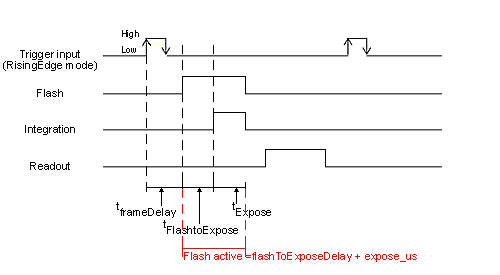
◆ expose_us
|
static |
An integer property which defines the exposure time for an image in us.
◆ exposeMode
|
static |
An enumerated integer property defining the exposure mode the camera sensor is operated in.
Valid values for this property may be: mvIMPACT.acquire.cemStandard, mvIMPACT.acquire.cemOverlapped, mvIMPACT.acquire.cemNoShutter.
- Note
- Not every device will offer the same options. Check for valid modes by reading the properties translation dictionary with the functions mvIMPACT.acquire.PropertyICameraExposeMode.getTranslationDictString and mvIMPACT.acquire.PropertyICameraExposeMode.getTranslationDictValue.
◆ frameDelay_us
|
static |
An integer property defining the delay in us between an external trigger event an the begin of the sensor exposure.
- Note
- This property is not supported by every device. Therefore always call the function mvIMPACT.acquire.Component.isValid to check if this property is available or not.
◆ gain_dB
|
static |
A float property defining the gain in dB.
The formula for given gain_dB is
gain_x= 10 ^ (gain_dB/20)
Example:
gain_x = 10 ^ (6/20) = 1.995
I.e. increasing the gain setting by 6dB corresponds to factor of 2.
The formula for given gain_x is
gain_dB = 20*log(gain_x) dB
Where:
gain_dB: Balluff gain value (logarithmic)
gain_x: multiplicative gain
^: power function
◆ imageRequestTimeout_ms
|
staticinherited |
An integer property defining the maximum time to wait for an image in ms.
- Attention
- Since Impact Acquire 2.32.0 the default value for this property has been changed! See Calling 'imageRequestWaitFor' Never Returns / An Application No Longer Terminates After Upgrading To Impact Acquire 2.32.0 Or Greater for details.
When this property is set to 0 the timeout never elapses. If the timeout this property defines elapses the currently processed request will be returned to the user even if no data has been captured so far. The result structure of the request object should be examined in that case. Also this should be considered as an error from the users point of view in which case he should clean up the acquisition queue by calling mvIMPACT.acquire.FunctionInterface.imageRequestReset. Afterwards the capture loop can be restarted.
- Note
- It is crucial to understand that this is a timeout PER REQUEST! The timespan taken into account for the measurement starts when the driver begins to capture data into this particular buffer! So when queuing 4 buffers with a timeout of 3000 ms each and no data being transmitted by the device for any reason will cause the last buffer to time out 3000*4 = 12000 ms AFTER the buffer has been queued and the acquisition has been started as the driver will wait for up to 3 seconds for each buffer that is being processed. When the device sends data this timeout does not affect the runtime behaviour at all. No additional delay is introduced by it when everything runs as planned.
◆ offset_pc
|
static |
A float property defining the analogue sensor offset in percent of the allowed range (sensor specific).
This property influences the average grey level when no light reaches the sensor.
mvBlueFOX specific: Changing its value will have no effect if mvIMPACT.acquire.CameraSettingsBlueFOX.offsetAutoCalibration is set to mvIMPACT.acquire.aocOn.
By default this value will be around 10 (if mvIMPACT.acquire.CameraSettingsBlueFOX.offsetAutoCalibration if set to mvIMPACT.acquire.aocOn). This means the average grey value for an image taken in a completely dark environment will be around 10. When setting mvIMPACT.acquire.CameraSettingsBlueFOX.offsetAutoCalibration to mvIMPACT.acquire.aocOff mvIMPACT.acquire.CameraSettingsBlueFOX.offset_pc can be used to modify this value.
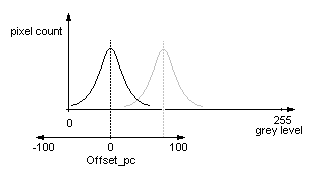
The valid range for this property lies between -100% and +100%, whereas negative values will shifts the black level towards 0 and positive values to 255.
- Note
- This property might not be supported by every device. Therefore always call the function mvIMPACT.acquire.Component.isValid to check if this property is available or not.
◆ pixelClock_KHz
|
static |
An enumerated integer property defining the pixel clock of the camera sensor in KHz.
Valid values for this property may be: mvIMPACT.acquire.cpcStandard, mvIMPACT.acquire.cpcHighSpeed, mvIMPACT.acquire.cpc6000KHz, mvIMPACT.acquire.cpc8000KHz, mvIMPACT.acquire.cpc10000KHz, mvIMPACT.acquire.cpc12000KHz, mvIMPACT.acquire.cpc13500KHz, mvIMPACT.acquire.cpc20000KHz, mvIMPACT.acquire.cpc24000KHz, mvIMPACT.acquire.cpc24540KHz, mvIMPACT.acquire.cpc27000KHz, mvIMPACT.acquire.cpc32000KHz, mvIMPACT.acquire.cpc37600KHz, mvIMPACT.acquire.cpc40000KHz, mvIMPACT.acquire.cpc50000KHz, mvIMPACT.acquire.cpc57600KHz.
- Note
- Changing the pixel clock at runtime will have major impact on the overall behaviour of the camera. The pixel clock should therefore not be modified constantly during the execution of the application code. Whenever this property is changed, the next images captured should be skipped if a device works with an active auto offset calibration controller circuit as then the control circuits on the camera might need one to three images until all control loops are locked again.
Every device or even different models belonging to the same device family may support different pixel clocks, thus it's crucial to query the valid clock modes for each sensor by reading the properties translation dictionary.
◆ pixelFormat
|
staticinherited |
An enumerated integer property defining the pixel format used to transfer the image data into the target systems host memory.
Support for this property has been added in version 1.11.0 of Impact Acquire thus old driver versions will raise an exception if an application accesses the property without checking if the property is present.
By default this property will be set to mvIMPACT.acquire.ibpfAuto. This will result in the previous driver behaviour where depending on the various post processing steps that are enabled or disabled the driver will decide which transfer format will be used. However sometimes this could result in a transfer format, which is not ideal for the application (e.g. when a post processing step of the application needs RGBx888Packed but the systems bandwidth is limited the application might want to transfer the data in YUV422 packed and then use the fast format conversion algorithm in the driver). This can be achieved by explicitly setting mvIMPACT.acquire.CameraSettingsBase.pixelFormat to mvIMPACT.acquire.ibpfYUV422Packed and mvIMPACT.acquire.ImageDestination.pixelFormat to mvIMPACT.acquire.ibpfRGBx888Packed.
- Note
- Selecting a defined transfer format can in some cases result in certain filters (e.g. dark current, ...) to be switched of as then the filters themselves can no longer influence the transfer format, which is sometimes necessary as not every filter does support every input format. Also this property will contain only pixel formats, which are actually supported by the capture device, thus in most of the cases this will be a subset of the pixel formats defined by the enumeration defining this property.
Valid values for this property may be: mvIMPACT.acquire.ibpfRaw, mvIMPACT.acquire.ibpfMono8, mvIMPACT.acquire.ibpfMono16, mvIMPACT.acquire.ibpfRGBx888Packed, mvIMPACT.acquire.ibpfYUV422Packed, mvIMPACT.acquire.ibpfRGBx888Planar, mvIMPACT.acquire.ibpfMono10, mvIMPACT.acquire.ibpfMono12, mvIMPACT.acquire.ibpfMono14, mvIMPACT.acquire.ibpfRGB888Packed, mvIMPACT.acquire.ibpfYUV444Planar, mvIMPACT.acquire.ibpfMono32, mvIMPACT.acquire.ibpfYUV422Planar, mvIMPACT.acquire.ibpfRGB101010Packed, mvIMPACT.acquire.ibpfRGB121212Packed, mvIMPACT.acquire.ibpfRGB141414Packed, mvIMPACT.acquire.ibpfRGB161616Packed, mvIMPACT.acquire.ibpfYUV422_UYVYPacked, mvIMPACT.acquire.ibpfMono12Packed_V2, mvIMPACT.acquire.ibpfYUV422_10Packed, mvIMPACT.acquire.ibpfYUV422_UYVY_10Packed, mvIMPACT.acquire.ibpfBGR888Packed, mvIMPACT.acquire.ibpfBGR101010Packed_V2, mvIMPACT.acquire.ibpfYUV444_UYVPacked, mvIMPACT.acquire.ibpfYUV444_UYV_10Packed, mvIMPACT.acquire.ibpfYUV444Packed, mvIMPACT.acquire.ibpfYUV444_10Packed, mvIMPACT.acquire.ibpfMono12Packed_V1, mvIMPACT.acquire.ibpfYUV411_UYYVYY_Packed, mvIMPACT.acquire.ibpfRGB888Planar, mvIMPACT.acquire.ibpfAuto.
◆ testMode
|
static |
An enumerated integer property defining the image transmission mode of the camera.
If this property is set to mvIMPACT.acquire.ctmOff the 'normal' image captured by the cameras sensor will be transmitted. This is the default. To ensure correct operation the camera might define several test modes where some kind of well defined pattern will be transmitted.
Valid values for this property may be: mvIMPACT.acquire.ctmOff, mvIMPACT.acquire.ctmGreyRamp, mvIMPACT.acquire.ctmMovingColor, mvIMPACT.acquire.ctmWBTest. No every test mode will be supported by every device.
◆ thisown
|
static |
◆ triggerMode
|
static |
An enumerated integer property which defines what kind of trigger mode shall be used for an image acquisition.
Valid values for this property may be: mvIMPACT.acquire.ctmContinuous, mvIMPACT.acquire.ctmOnDemand, mvIMPACT.acquire.ctmOnLowLevel, mvIMPACT.acquire.ctmOnHighLevel, mvIMPACT.acquire.ctmOnFallingEdge, mvIMPACT.acquire.ctmOnRisingEdge, mvIMPACT.acquire.ctmOnHighExpose, mvIMPACT.acquire.ctmOnLowExpose, mvIMPACT.acquire.ctmOnAnyEdge, mvIMPACT.acquire.ctmFramerateControlled.
- Note
- Not every device will support every trigger mode. To find out which trigger modes are supported by a specific device at runtime the properties translation dictionary should be queried.
- Also the sensor specific part of this manual will contain a list of trigger modes that are available for this specific image sensor.
