Loading...
Searching...
No Matches
Operation
This product is developed and maintained in accordance with applicable cybersecurity requirements and internal secure development processes.
Intended Use
The Impact Acquire framework is intended to be used by professional software developers for the development of custom applications that interface with compatible industrial image acquisition devices (e.g., cameras, frame grabbers) as well as other devices complying with industrial standards such as GigE Vision™ and USB3 Vision™.
The Impact Acquire framework provides programming interfaces (APIs), libraries, device drivers, applications, tools and documentation to:
- Configure and control supported devices
- Acquire and transfer image data to host systems
- Enable integration of image acquisition functionality into user-defined applications
- Support typical machine vision use cases such as inspection, automation, and monitoring
- Continuous or single image acquisition for visualization, storage, or further processing in higher-level applications
- Configuration of accessory hardware such as a lighting controller complying with the standards mentioned above
- Note
- Impact Acquire itself:
- Does not perform any safety-related or decision-making function
- Does not process the image content for deriving decisions from that processing (e.g., no face recognition, object detection, classification or safety logic is incorporated into the framework). It may however modify the image data by other means (e.g., by flipping the image data in memory). See Image Processing for more information on this topic
- Does not operate devices autonomously
All application-level behavior, including any processing to derive decisions from the acquired data, interpretation of the acquired data, or system response based on acquired data is the sole responsibility of the integrator using this SDK.
Intended Users
Impact Acquire is intended exclusively for:
- Qualified software developers
- System integrators with knowledge of the used programming language and image acquisition systems
- Personnel trained in secure system integration and deployment practices
Users are expected to:
- Understand and implement appropriate security measures for device access and communication interfaces
- Ensure that access to systems using Impact Acquire is restricted to authorized individuals only
Intended Environment
Impact Acquire is intended to be used in controlled environments such as:
- Industrial automation systems
- Laboratory or development environments
- Machine vision and inspection systems
In addition, the secure and compliant use of Impact Acquire requires that:
- Impact Acquire is usually integrated into a larger application and is not used standalone
- The execution environment (OS, network, and system security) is controlled by the integrator or the operator of the software
- Logical access to Impact Acquire APIs, services, and integrated applications is controlled via appropriate authentication and authorization mechanisms
- Network communication channels used for device control and data transfer are protected, restricted, and limited to trusted environments
- Physical deployment ensures that devices and host systems are not accessible to unauthorized personnel
Forseeable Misuse
Impact Acquire is not foreseen and intended for:
- Direct use in safety-critical systems where failure could endanger human life or health
- Applications requiring certified functional safety (e.g., IEC 61508, ISO 13849)
- Applications processing and storing private data (portraits, body images, biometrical data, etc.) without additional security measures
- Application processing or storing critical or sensitive data without additional security measures
- Uncontrolled deployment in hostile or publicly accessible network environments without additional security measures
- Use as a standalone product without embedding it into some sort of application or access controlled security layer
- Use by private users
- Use by end users without technical expertise
Responsibilities Of The Integrator
The integrator of Impact Acquire is responsible for:
- Defining the final application behavior and risk profile
- Implementing appropriate security measures in the application and deployment environment
- Ensuring compliance with applicable regulations (including CRA, if applicable to the final product)
- Validating that the system design is suitable for the intended operational context
Shared Libraries
Since Impact Acquire is a software development kit (SDK) and not a standalone application, it is the responsibility of the integrator to ensure that the final application built using Impact Acquire is secure and does not expose any vulnerabilities to attackers. The integrator should also ensure that the final application is tested for security vulnerabilities and that appropriate security measures are implemented.
Especially due to the nature of an SDK, it is possible (depending on the way the application using it has been built) that individual shared libraries of the SDK are modified or even replaced by an attacker. This could lead to a situation where the application using the SDK is compromised and the attacker could gain access to the host system or the device. This is not an exclusive vulnerability of Impact Acquire alone, but rather a potential risk of using shared libraries in general.
One way to mitigate this risk is to use code signing and integrity checks for the shared libraries used in the final application. This can help ensure that the libraries have not been tampered with and are from a trusted source. However this can only work, if
- all libraries used by the final application as well as the final application itself are signed and checked for integrity
- The final application does not directly link to the shared libraries of Impact Acquire, but rather uses a wrapper to dynamically load shared libraries at runtime and checks every component it will load for integrity before loading
- Note
- Since it is almost impossible to know about every component that is used by the application (since this would include a lot of OS specific libraries as well), a better approach is to make sure that the host system is secured from any unauthorized access so that no malicious code can be deployed on the machine.
Protocols And Technologies
Impact Acquire utilizes the following industry-standard protocols and technologies for image acquisition and device communication:
Network Communication Protocols
GigE Vision™ (GVCP/GVSP/GVRSP)
When working with GigE Vision™ devices such as BVS CA-GT (mvBlueCOUGAR-XT), BVS CA-GX, mvBlueCOUGAR-X(D), the following protocol is used:
- Used Protocol Version: GigE Vision™ 1.0 - 3.0 (IEEE 802.3 compliant)
- Purpose: Network-based device control and streaming
- Components:
- GVCP (GigE Vision™ Control Protocol): Device discovery, configuration, and control over UDP port 3956
- GVSP (GigE Vision™ Streaming Protocol): High-speed image data transmission over UDP high ports
- GVRSP (GigE Vision™ RDMA Streaming Protocol): High-speed image data transmission over UDP port 4791 leveraging RDMA (Remote Direct Memory Access) for low-latency applications based on the InfiniBand architecture
- GVMP (GigE Vision™ Message Protocol): Event data transmission over UDP high ports
- Security Considerations: Unencrypted UDP traffic; should be used on isolated/trusted networks only
HTTP
Some tools (usually not shipped to end customers but used for evaluation of Balluff products) by default may check for updated versions of Impact Acquire from time to time, when started.
See Updates Via The Internet for more information.
- Note
- This only applies to the tools mentioned in the section referenced above. The SDK itself does not use HTTP for any communication with the devices, host system or any remote system.
Other Protocols
USB3 Vision™
When working with USB3 Vision™ devices such as BVS CA-SF (mvBlueFOX3), the following protocol is used:
- Protocol Version: USB3 Vision 1.0/1.1
- Transport: USB 2.0/3.0/3.1 SuperSpeed/SuperSpeed+ (5-10 Gbits/s)
- Purpose: High-bandwidth device communication over USB
- Standard Compliance: AIA USB3 Vision Standard, USB-IF
- Security Considerations: Unencrypted traffic; should be used on isolated/trusted USB connections only
USB2
When working with Balluff USB2 devices such as BVS CA-MLC, BVS CA-IGC, mvBlueFOX or BVS CA-UB, the following protocol is used:
- Protocol: Proprietary USB2-based communication protocol
- Transport: USB 1.1/2.0 Full-Speed/Hi-Speed (12-480 Mbit/s)
- Purpose: High-bandwidth device communication over USB
- Standard Compliance: USB-IF
- Security Considerations: Unencrypted traffic; should be used on isolated/trusted USB connections only
PCIe
When working with Balluff PCIe devices such as BVS CA-BN (mvBlueNAOS), the following protocol is used:
- Protocol: Proprietary PCIe-based communication protocol
- Transport: PCIe Gen. 2, 2-4 lanes
- Purpose: High-bandwidth device communication using PCIe
- Standard Compliance: Proprietary PCIe-based communication protocol
- Security Considerations: Unencrypted traffic; should be used on isolated/trusted environments only
GenICam™ (Generic Interface For Cameras)
When working with devices that are operated using a GenICam™ GenTL compliant producer such as GigE Vision™, USB3 Vision™ or Balluff PCIe devices such as BVS CA-BN (mvBlueNAOS), the following protocol is used:
- Version: GenICam 3.x
- Purpose: Standardized device feature access and configuration
- XML Schema: GenApi (Generic Application Programming Interface)
Security And Vulnerability Management
Vulnerability Disclosure
Security vulnerabilities should be reported to:
- Contact: psirt.nosp@m.@bal.nosp@m.luff..nosp@m.de
- Response Time: Initial response within 72 hours
- Disclosure Policy: Coordinated disclosure following industry best practices
Known Security Limitations
- Warning
- Network Protocols Security: The following protocols operate without encryption:
- GigE Vision™ (GVCP/GVSP/GVRSP): Unencrypted UDP communication
Mitigation: Deploy on isolated networks or VLANs separated from untrusted networks. Use network segmentation and firewall rules to restrict access.
- Warning
- The following protocols operate without encryption:
- USB, USB3 Vision™ and PCIe: Direct hardware interface without authentication
Third-Party Dependencies
Detailed information on third-party components Impact Acquire relies on can be found here: Used Third Party Software
Apart from the third-party components, Impact Acquire itself also depends on the operating system it is deployed on.
- Note
- Users are responsible for maintaining up-to-date operating system patches and security updates for the host environment. This also applies to any third-party components by Impact Acquire which are not shipped as part of the installation package. One example is the libusb library on Linux systems, which is not shipped with Impact Acquire but is required for the GenTL Producer to work with USB3 Vision™ devices.
Secure Deployment Recommendations
- Network Isolation: Deploy devices on dedicated VLANs
- Access Control: Implement least-privilege access to device interfaces
- Update Management: Regularly check for SDK updates and security patches
- Input Validation: Validate all device configurations and user inputs
- Logging: Enable diagnostic logging for security monitoring
Standards Compliance
Impact Acquire adheres to:
- EU Cyber Resilience Act (CRA): Security-by-design principles
- IEC 62443-4-1: Secure product development life-cycle
- GDPR: No personal data processing (device identifiers only)
Data Processing
Collected Device Information
Impact Acquire might collect the following device-related information for operational purposes:
- Device serial numbers, MAC addresses, firmware versions
- Network configuration (IP addresses, subnet masks)
- Performance metrics (frame rates, bandwidth utilization)
None of this information is personally identifiable information (PII) or sensitive data. It is used solely for device management, diagnostics, and performance optimization. None of this information is transmitted externally or stored in the cloud without the users explicit consent.
Data Storage
Impact Acquire stores configuration and operational data locally on the host system. No external cloud storage is used.
- Local configuration files might get stored in user/system directories
- No telemetry or analytics is transmitted externally
- Statistical data for diagnostics and troubleshooting might get stored on the host system (function call success/failure rates, error codes)
- log files for debugging and support purposes if configured by the user might get stored on the host system (on by default). See Logging for more information.
None of this information is personally identifiable information (PII) or sensitive data. It is used solely for device management, diagnostics, and performance optimization. None of this information is transmitted externally or stored in the cloud without the users explicit consent.
Updates Via The Internet
Impact Acquire (namely the GUI tools ImpactControlCenter and DeviceConfigure) may check for updates via the Internet. This is done by sending a request to the Balluff update server. The request contains no personally identifiable information (PII) but downloads a small file containing the latest version information and then compares this information with the installed version of the Impact Acquire package. The update check can be disabled in the GUI tools (or can be triggered manually):
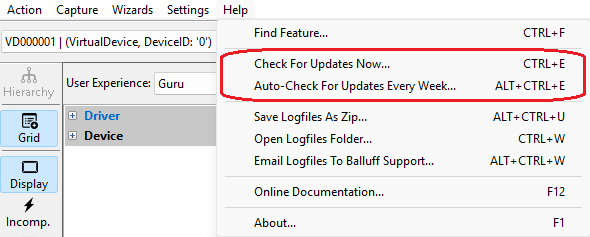
For the DeviceConfigure tool, the update check can be found in the Help menu as well. See here for more information about these GUI tools.
Improper Use
- Warning
- Improper use of Impact Acquire can lead to security vulnerabilities, data breaches, and operational failures. Users must ensure that the software is used in accordance with the intended use and within secure environments. Improper use includes, but is not limited to
- deploying the software in untrusted networks
- failing to apply security patches
- using the software in safety-critical applications without appropriate safeguards
- using the software to process sensitive or personal data without implementing necessary security measures
- using the software in a manner that
- violates applicable laws or regulations
- exposes the host system or connected devices to unauthorized access or control
- allows for the execution of arbitrary code or commands on the host system or connected devices
- allows for denial of service (DoS) attacks or other disruptions to the operation of the host system or connected devices
- allows for the injection of invalid data or commands into the host system or connected devices
- allows for the disclosure of sensitive information or business secrets to unauthorized parties
- allows for the compromise of the integrity or confidentiality of the data being processed or transmitted by the software
- allows for the circumvention of security controls or access restrictions implemented on the host system or connected devices
- See also
Potential Risks
- Espionage: Attacker may try to steal business secrets or other interesting data (from the network) depending on what kind of image data is captured. This could be mitigated by using isolated networks and secure access controls. An attacker could also try to gain access to the host system and steal data from there
- Sabotage: Attacker may attempt to disrupt or impact operation (via the network)
- Extortion: Attacker may attempt to extort money from user by threaten to disclose stolen information
- Attackers could identify a vulnerability in Impact Acquire and try to exploit it in order to get access to the host on which Impact Acquire runs
- Attackers might be able to trigger a buffer overflow and execute arbitrary code
- Attackers might be able to trigger a denial of service (DoS) condition and make the host system or the device unavailable for a certain period of time
- Attackers might be able to inject invalid data into the device or the host system and cause unexpected behavior
- See Known Security Limitations as well
All this could be mitigated by using secure host systems and keeping them up to date with security patches for every software component running on that system.
