Loading...
Searching...
No Matches
BVS CA-GV1-0032BC (3.2 Mpix [2064 x 1552])
Introduction
The sensor uses a global shutter, i.e. light exposure takes place on all pixels in parallel, although subsequent readout is sequential.
| Feature | Description |
| Manufacturer | Sony |
| Sensor name | IMX900 |
| Max. frames per second | 94.8 |
| Max. lines blockscan | 65028 |
| Device Structure | CMOS image sensor |
| SNRmax [dB]1/ | 39.9 |
| DNR (normal / HDR) [dB]1/ | 64.0 / - |
| Image size | 1/3.1 |
| Number of effective pixels | 2064 (H) x 1552 (V) |
| Unit cell size | 2.25µm (H) x 2.25µm (V) |
| ADC resolution / output | 12 bit → 8/10/(12) |
1 Measured accord. to EMVA1288 with gray scale version of the camera
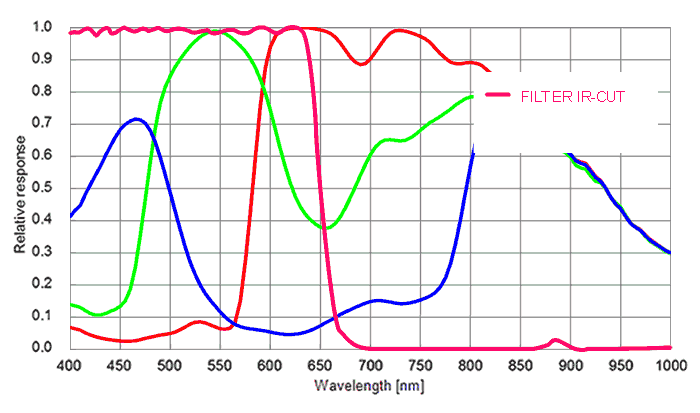
Spectral Sensitivity
Timings
Frame rate calculator
- Note
- The calculator returns the max. frame rate supported by the sensor. Please keep in mind that it will depend on the interface and the used image format if this frame rate can be transferred.
- Note
- The exposure time step width is limited to the sensor's rowtime and therefore
- auto exposure with very low exposure times will perform with relatively large increments and
- exposure mode = TriggerWidth (if available) will perform with a jitter corresponding to the rowtime.
- auto exposure with very low exposure times will perform with relatively large increments and
The following trigger modes are available:
| Setting (GenICam) | Mode / Setting (obsolete "Device Specific") | Description |
"TriggerSelector = FrameStart" "TriggerMode = Off" | Continuous | Free running, no external trigger signal needed. |
"TriggerSelector = FrameStart" "TriggerMode = On" "TriggerSource = Software" "ExposureMode = Timed" To trigger one frame execute the TriggerSoftware@i command then. | OnDemand | Image acquisition triggered by command (software trigger). |
"TriggerSelector = AcquisitionActive" "TriggerMode = On" "TriggerSource = <desired_Line></desired_Line>" "TriggerActivation = LevelLow" "ExposureMode = Timed" | OnLowLevel | Start an exposure of a frame as long as the trigger input is below the trigger threshold. (No FrameTrigger!) |
"TriggerSelector = AcquisitionActive" "TriggerMode = On" "TriggerSource = <desired_Line></desired_Line>" "TriggerActivation = LevelHigh" "ExposureMode = Timed" | OnHighLevel | Start an exposure of a frame as long as the trigger input is above the trigger threshold. (No FrameTrigger!) |
"TriggerSelector = FrameStart" "TriggerMode = On" "TriggerSource = <desired_Line></desired_Line>" "TriggerActivation = FallingEdge" "ExposureMode = Timed" | OnFallingEdge | Each falling edge of trigger signal acquires one image. |
"TriggerSelector = FrameStart" "TriggerMode = On" "TriggerSource = <desired_Line></desired_Line>" "TriggerActivation = RisingEdge" "ExposureMode = Timed" | OnRisingEdge | Each rising edge of trigger signal acquires one image. |
"TriggerSelector = FrameStart" "TriggerMode = On" "TriggerSource = <desired_Line></desired_Line>" "TriggerActivation = AnyEdge" "ExposureMode = Timed" | OnAnyEdge | Start the exposure of a frame when the trigger input level changes from high to low or from low to high. |
