Loading...
Searching...
No Matches
ContinuousCaptureQt.cpp
The ContinuousCaptureQt program is a software example based on the usage of the Qt library (https://www.qt.io/). It will show the a live image in a graphical user interface generated with Qt.
- Program location
- The source file ContinuousCaptureQt.cpp can be found under:
%INSTALLDIR%\apps\ContinuousCaptureQt\
- Note
- If you have installed the package without example applications, this file will not be available. On Windows® the source code of the sample application can be installed or removed from the target system at any time by simply restarting the installation package.
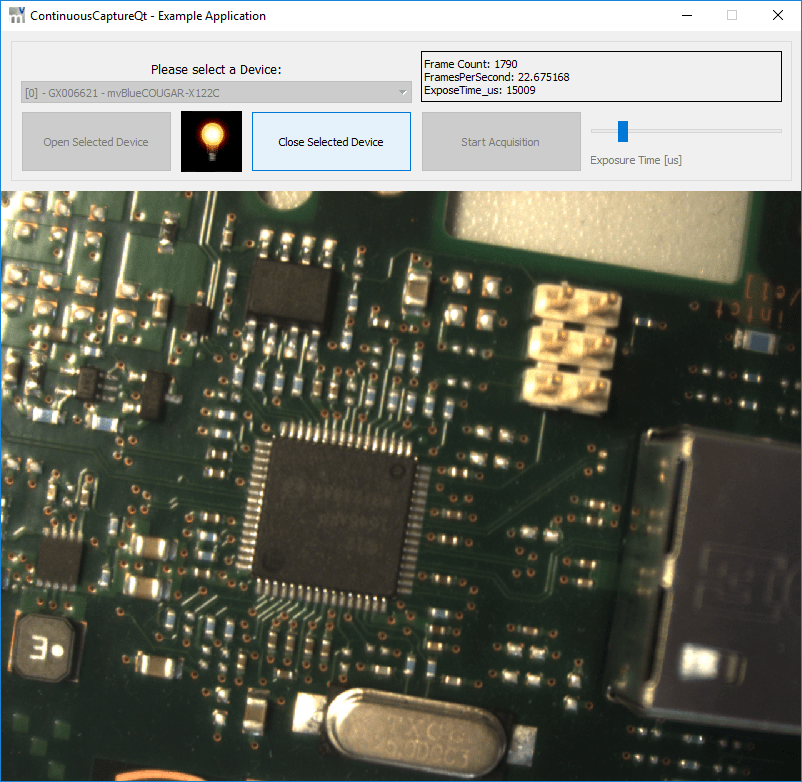
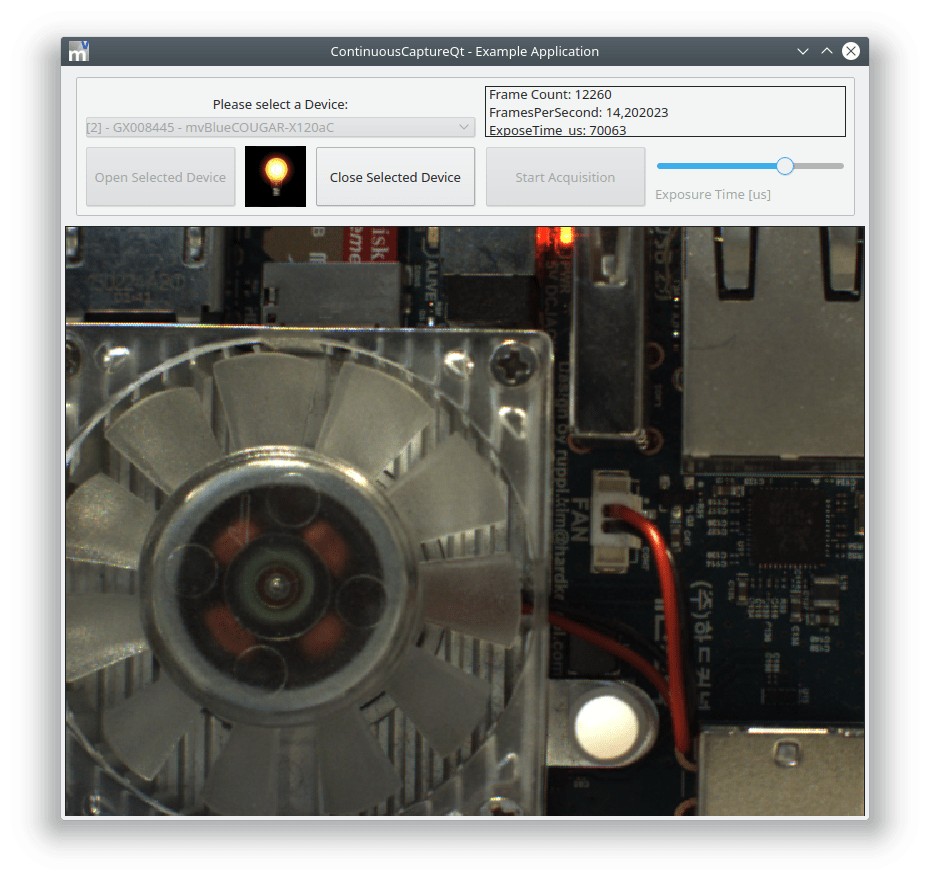
When compiled the application will look like this on a Windows® system:
- How it works
- The ContinuousCaptureQt sample has a few buttons which allow to open/close the camera and to start the acquisition process. Once a camera is opened, the acquisition process can be started by clicking the "Start Acquisition"-Button. Once the acquisition is started, the live image will be displayed below the buttons.
- Have a look at the way QMutex instances are used to make sure request data is passed correctly between capture thread and display
- See the process function of the CaptureThread class to see how to decouple the displaying of images from the actual capturing. The thread will try to capture all data from a device but will only display as many frames as the display engine can digest. Others are simply unlocked and passed back into the capture engine
- A much more complex example having non of the limitation mentioned next would be ImpactControlCenter for which the source code is also available
- Limitations
- The most important thing to notice is that the way images are displayed has been kept rather simple. Resize/repaint events will NOT be handled so e.g. stopping the live acquisition an moving the window will invalidate the window content. Moving another window over the image will NOT repaint the image etc.. When this is desired be sure to keep the request currently attached to the display LOCKED until attaching another request to the display OR until removing the image from the display as unlocking might free the associated memory of the request buffer and repaint events would access this potentially freed memory!
- The exposure time slider has only been implemented for devices supporting the GenICam™ interface layout. Also it would be much nicer to implement this slider with a logarithmic behaviour but again this would make the code more complicated
- Only a single device can be opened by the application at a given time in order not to have complicated internal data structures
- The Qt based implementation of the ImageCanvas class does only support TImageBufferPixelFormat::ibpfMono8 and TImageBufferPixelFormat::ibpfBGR888Packed in order not bloat the code with a lot of pixel format conversion code to overcome the limitations of the QImage class
- Note
- This example assumes basic knowledge about the Qt library and will not explain how to write a GUI application using the Qt framework. After all there is an unlimited amount of information about how to achieve that available already. As the setup of a Qt based project e.g. for Visual Studio is rather platform and system specific there also is no ready to use Visual Studio project or Makefile available right now as e.g. the location and/or the version of the Qt framework will differ from system to system. However future versions with CMake support for building Impact Acquire examples will provide CMake based build instructions which will close this gap.
- The image displaying functionality is implemented for Windows® and Linux in different ways since on Windows® Impact Acquire provides the mvDisplay library which is a highly optimized library providing displaying functionalities for all of Impact Acquire supported pixel formats. See mvIMPACT::acquire::display for more information. On Linux Impact Acquire does not support this library so the displaying image data is done using the QImage class of the Qt library. It will work for Windows® as well, but the mvDisplay library is much more convenient to use.
//
// @description: Example applications for Impact Acquire
// @copyright: Copyright (C) 2018 - 2026 Balluff GmbH
// @authors: APIs and drivers development team at Balluff GmbH
// @initial date: 2018-12-06
//
// Permission is hereby granted, free of charge, to any person obtaining a copy of this software and associated documentation files (the "Software"),
// to deal in the Software without restriction, including without limitation the rights to use, copy, modify, merge, publish, distribute, sublicense,
// and/or sell copies of the Software, and to permit persons to whom the Software is furnished to do so, subject to the following conditions:
//
// The above copyright notice and this permission notice (including the next paragraph) shall be included in all copies or substantial portions of the Software.
//
// THE SOFTWARE IS PROVIDED "AS IS", WITHOUT WARRANTY OF ANY KIND, EXPRESS OR IMPLIED, INCLUDING BUT NOT LIMITED TO THE WARRANTIES OF MERCHANTABILITY,
// FITNESS FOR A PARTICULAR PURPOSE AND NONINFRINGEMENT. IN NO EVENT SHALL THE AUTHORS OR COPYRIGHT HOLDERS BE LIABLE FOR ANY CLAIM, DAMAGES OR OTHER LIABILITY,
// WHETHER IN AN ACTION OF CONTRACT, TORT OR OTHERWISE, ARISING FROM, OUT OF OR IN CONNECTION WITH THE SOFTWARE OR THE USE OR OTHER DEALINGS IN THE SOFTWARE.
//
#include "ContinuousCaptureQt.h"
#include <common/STLHelper.h>
#include <apps/Common/qtIncludePrologue.h>
#include <QDebug>
#include <QStyleFactory>
#include <QMessageBox>
#include <apps/Common/qtIncludeEpilogue.h>
//-----------------------------------------------------------------------------
ContinuousCaptureQt::ContinuousCaptureQt( QWidget* parent ) : QMainWindow( parent ),
pCaptureThread_( 0 ), pImageCanvas_( 0 ), devMgr_(), pThread_( 0 ), lock_(), pFI_( 0 ), pAC_( 0 )
//-----------------------------------------------------------------------------
{
setupUi( this );
icon_label->setPixmap( QPixmap( QString::fromUtf8( ":/bulb-off.png" ) ) );
sliderExposureTime->setVisible( false );
label_exposureSlider->setVisible( false );
pImageCanvas_ = new ImageCanvas( label_image );
populateCombobox();
}
//-----------------------------------------------------------------------------
ContinuousCaptureQt::~ContinuousCaptureQt()
//-----------------------------------------------------------------------------
{
cleanUp();
DeleteElement( pImageCanvas_ );
}
//-----------------------------------------------------------------------------
void ContinuousCaptureQt::cleanUp( Device* pDev /* = 0 */ )
//-----------------------------------------------------------------------------
{
QMutexLocker lockedScope( &lock_ );
if( pCaptureThread_ )
{
pCaptureThread_->terminate();
if( pThread_ )
{
pThread_->terminate();
pThread_->wait();
}
}
if( pDev && pDev->isOpen() )
{
pDev->close();
}
pImageCanvas_->SetImage( 0 );
DeleteElement( pCaptureThread_ );
DeleteElement( pThread_ );
DeleteElement( pFI_ );
DeleteElement( pAC_ );
}
//-----------------------------------------------------------------------------
void ContinuousCaptureQt::closeEvent( QCloseEvent* pEvent )
//-----------------------------------------------------------------------------
{
cleanUp( getDevice( comboBox->currentIndex() ) );
pEvent->accept();
}
//-----------------------------------------------------------------------------
void ContinuousCaptureQt::closeSelectedDevice( void )
//-----------------------------------------------------------------------------
{
try
{
cleanUp( getDevice( comboBox->currentIndex() ) );
label_StatusMessage->setText( "" );
close_button->setEnabled( false );
comboBox->setEnabled( true );
open_button->setEnabled( true );
acquisition_button->setEnabled( false );
icon_label->setPixmap( QPixmap( QString::fromUtf8( ":/bulb-off.png" ) ) );
}
catch( const ImpactAcquireException& e )
{
QString msg;
QTextStream( &msg ) << "Error while closing device! Error message: " << QString::fromStdString( e.getErrorCodeAsString() ) << "\nError Code: " << e.getErrorCode();
QMessageBox::warning( this, "Error", msg, QMessageBox::Ok, QMessageBox::Ok );
text_label->setText( "ERROR CLOSING THE DEVICE" );
}
}
//-----------------------------------------------------------------------------
void ContinuousCaptureQt::errorString( QString msg )
//-----------------------------------------------------------------------------
{
label_StatusMessage->setText( msg );
qDebug() << "Error! - " << msg;
}
//-----------------------------------------------------------------------------
void ContinuousCaptureQt::openSelectedDevice( void )
//-----------------------------------------------------------------------------
{
try
{
Device* pDev = getDevice( comboBox->currentIndex() );
conditionalSetProperty( pDev->interfaceLayout, dilGenICam );
pDev->open();
pFI_ = new FunctionInterface( pDev );
if( pDev->interfaceLayout.isValid() && ( pDev->interfaceLayout.read() == dilGenICam ) )
{
pAC_ = new GenICam::AcquisitionControl( pDev );
}
setupExposureTimeSlider();
comboBox->setEnabled( false );
open_button->setEnabled( false );
close_button->setEnabled( true );
acquisition_button->setEnabled( true );
icon_label->setPixmap( QPixmap( QString::fromUtf8( ":/bulb-on.png" ) ) );
}
catch( const ImpactAcquireException& e )
{
QString msg;
QTextStream( &msg ) << "Error while opening device! Error message: " << QString::fromStdString( e.getErrorCodeAsString() ) << "\nError Code: " << e.getErrorCode();
QMessageBox::warning( this, "Error", msg, QMessageBox::Ok, QMessageBox::Ok );
text_label->setText( "ERROR OPENING THE DEVICE" );
}
}
//-----------------------------------------------------------------------------
void ContinuousCaptureQt::populateCombobox( void )
//-----------------------------------------------------------------------------
{
QStringList comboBoxEntries;
for( unsigned int i = 0; i < devMgr_.deviceCount(); i++ )
{
Device* pDev = devMgr_.getDevice( i );
QString entry;
QTextStream( &entry ) << "[" << i << "] - " << QString::fromStdString( pDev->serial.readS() ) << " - " << QString::fromStdString( pDev->product.readS() );
comboBoxEntries.append( entry );
}
comboBox->addItems( comboBoxEntries );
}
//-----------------------------------------------------------------------------
void ContinuousCaptureQt::requestReady( void )
//-----------------------------------------------------------------------------
{
QMutexLocker lockedScope( &lock_ );
if( pThread_ && pThread_->isRunning() )
{
const int requestNumber = pCaptureThread_->getPendingRequestNr();
if( requestNumber != INVALID_ID )
{
pImageCanvas_->SetImage( pFI_->getRequest( requestNumber ) );
}
}
}
//-----------------------------------------------------------------------------
void ContinuousCaptureQt::setExposureTime( int value )
//-----------------------------------------------------------------------------
{
if( pAC_ )
{
pAC_->exposureTime.write( value );
qDebug() << "Set Exposure Time Value to " << value << " - New Value: " << pAC_->exposureTime.read();
}
}
//-----------------------------------------------------------------------------
void ContinuousCaptureQt::setupExposureTimeSlider( void )
//-----------------------------------------------------------------------------
{
if( pAC_ )
{
conditionalSetEnumPropertyByString( pAC_->exposureAuto, "Off" );
if( pAC_->exposureTime.isValid() )
{
if( pAC_->exposureTime.hasMaxValue() )
{
sliderExposureTime->setMaximum( 100000 );
}
if( pAC_->exposureTime.hasMinValue() )
{
sliderExposureTime->setMinimum( static_cast< int >( pAC_->exposureTime.getMinValue() ) );
}
}
sliderExposureTime->setSingleStep( 100 );
sliderExposureTime->setSliderPosition( static_cast< int >( pAC_->exposureTime.read() ) );
sliderExposureTime->setVisible( true );
label_exposureSlider->setVisible( true );
}
else
{
sliderExposureTime->setVisible( false );
label_exposureSlider->setVisible( false );
}
}
//-----------------------------------------------------------------------------
void ContinuousCaptureQt::startAcquisition( void )
//-----------------------------------------------------------------------------
{
pCaptureThread_ = new CaptureThread( getDevice( comboBox->currentIndex() ), false, pFI_ );
pThread_ = new QThread;
pCaptureThread_->moveToThread( pThread_ );
// Signal emitted in case of acquisition errors
connect( pCaptureThread_, SIGNAL( error( QString ) ), this, SLOT( errorString( QString ) ) );
connect( pCaptureThread_, SIGNAL( finished() ), pThread_, SLOT( quit() ) );
connect( pCaptureThread_, SIGNAL( finished() ), pCaptureThread_, SLOT( deleteLater() ) );
// signal emitted in case of an acquired image ready to be displayed
connect( pCaptureThread_, SIGNAL( requestReady() ), this, SLOT( requestReady() ) );
// start signal for the capture thread
connect( pThread_, SIGNAL( started() ), pCaptureThread_, SLOT( process() ) );
// update signal for the statistics label
connect( pCaptureThread_, SIGNAL( updateStatistics( const QString& ) ), this, SLOT( updateStatistics( const QString& ) ) );
// update signal for the exposure time slider
connect( sliderExposureTime, SIGNAL( valueChanged( int ) ), this, SLOT( setExposureTime( int ) ) );
pThread_->start();
if( pThread_->isRunning() )
{
acquisition_button->setEnabled( false );
}
}
//-----------------------------------------------------------------------------
void ContinuousCaptureQt::userSelectedDeviceInComboBox( void )
//-----------------------------------------------------------------------------
{
open_button->setEnabled( true );
text_label->setText( "Please Select A Device:" );
}
