Loading...
Searching...
No Matches
The Impact Acquire Software Stack
The Impact Acquire framework compatible with all BVS CA-SF device variants described by this document represents a unified API for a programmer to access, configure and acquire data from a wide range of hardware. It allows to develop applications that can be used without the need for any major modifications with all the various image processing products offered by Balluff GmbH as well as various third party devices as well. New releases can be obtained free of charge from here.
The following diagram shows a schematic structure of the Impact Acquire software stack also highlighting various third party packages that can interface with the Impact Acquire framework:
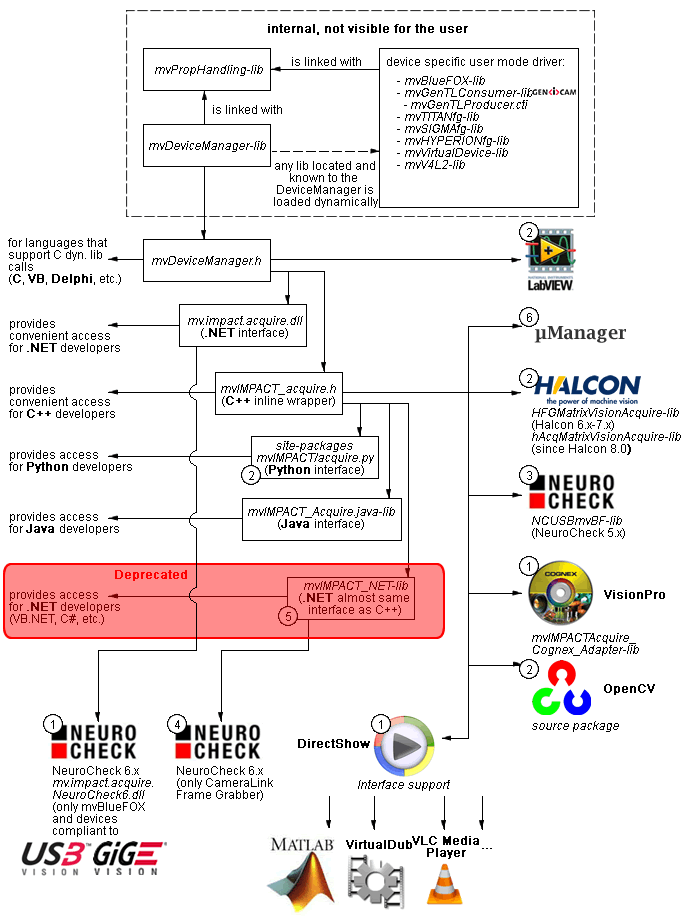
- 1 Part of any Impact Acquire Windows® installation package.
- 2 Separately available for different target operating systems.
- 3 See 2, but requires USB2 support being enabled during the installation of the Impact Acquire framework installation.
- 4 Part of the NeuroCheck installer but requires at least one frame grabber specific package of Impact Acquire being installed (deprecated).
- 5 Part of the mvIMPACT SDK installation. However, new designs should use the .NET libs that are now part of Impact Acquire (mv.impact.acquire.dll). The namespace mv.impact.acquire of mv.impact.acquire.dll provides a more natural and more efficient access to the same features as contained in the deprecated namespace mvIMPACT_NET.acquire of mvIMPACT_NET.dll, which is why the latter one should only be used for backward compatibility but NOT when developing a new application. How to port code written with the old .NET interface to the new one is explained here: here.
- 6 Part of Micro-Manager.
- Note
- More information about how to write applications using the Impact Acquire SDK can be found here.
NeuroCheck Support
A couple of devices are supported by NeuroCheck. However between NeuroCheck 5.x and NeuroCheck 6.x there has been a breaking change in the internal interfaces. Therefore also the list of supported devices differs from one version to another and some additional libraries might be required.
For NeuroCheck 5.x the following devices are supported:
| Device | Additional software needed |
| mvTITAN-G1 | mvSDK hardware driver for mvTITAN/mvGAMMA devices |
| mvTITAN-CL | mvSDK hardware driver for mvTITAN/mvGAMMA devices |
| mvGAMMA-CL | mvSDK hardware driver for mvTITAN/mvGAMMA devices |
| mvBlueFOX | Impact Acquire with enabled support for USB2 devices, NCUSBmvBF.dll |
For NeuroCheck 6.0 the following devices are supported:
| Device | Additional software needed |
| mvTITAN-G1 | Impact Acquire with enabled support for mvTITAN/mvGAMMA devices |
| mvTITAN-CL | Impact Acquire with enabled support for mvTITAN/mvGAMMA devices |
| mvGAMMA-CL | Impact Acquire with enabled support for mvTITAN/mvGAMMA devices |
| mvHYPERION-CLb | Impact Acquire with enabled support for mvHYPERION devices |
| Every other Impact Acquire compliant device | Impact Acquire with enabled support for the corresponding device family, mv.impact.acquire.NeuroCheck6.dll (comes as part of the Impact Acquire package, but must be installed AFTER installing NeuroCheck 6 |
For NeuroCheck 6.1 the following devices are supported:
| Device | Additional software needed |
| mvTITAN-G1 | Impact Acquire with enabled support for mvTITAN/mvGAMMA devices |
| mvTITAN-CL | Impact Acquire with enabled support for mvTITAN/mvGAMMA devices |
| mvGAMMA-CL | Impact Acquire with enabled support for mvTITAN/mvGAMMA devices |
| mvHYPERION-CLb | Impact Acquire with enabled support for mvHYPERION devices |
| Impact Acquire with enabled support for the corresponding device family, mv.impact.acquire.NeuroCheck6_1.dll (comes as part of the Impact Acquire package, but must be installed AFTER installing NeuroCheck 6.1 |
VisionPro Support
Every Impact Acquire package on Windows® comes with an adapter to VisionPro from Cognex. The installation order does not matter. After the Impact Acquire package and VisionPro have been installed, the next time VisionPro is started it will allow selecting the Impact Acquire device. No additional steps are needed.
Balluff/MATRIX VISION devices that also comply with the GigE Vision™ or USB3 Vision™ standard don't need any software at all, but can also use VisionPro's built-in GigE Vision™ or USB3 Vision™ support.
HALCON Support
HALCON comes with built-in support for Impact Acquire compliant devices, so once a Impact Acquire package has been installed for the Impact Acquire device, it can also be operated from a HALCON environment using the corresponding acquisition interface. No additional steps are needed.
Balluff/MATRIX VISION devices that also comply with the GigE Vision™ standard don't need any software at all, but can also use HALCON's built-in GigE Vision™ support.
As some products supported by the Impact Acquire framework also come with a GenTL compliant interface, these can also be operated through HALCON's built-in GenTL acquisition interface.
LabVIEW Support
Every Impact Acquire compliant device can be operated with LabVIEW through an additional set of VIs which are shipped by Balluff as a separate installation component, that must be enabled explicitly during the installation to be available afterwards.
Balluff/MATRIX VISION devices that also comply with the GigE Vision™ or USB3 Vision™ standard don't need any additional software at all, but can also be operated through LabVIEW's GigE Vision™ or USB3 Vision™ support packages.
DirectShow Support
Every Impact Acquire package comes with an interface to DirectShow. In order to be usable from a DirectShow compliant application, devices must first be registered for DirectShow support. How to this is explained here.
Micro-Manager Support
Every Impact Acquire compliant device can be operated using https://micro-manager.org when using Impact Acquire and at least Micro-Manager 1.4.23 build AFTER 15.12.2016. The adapter needed is part of the Micro-Manager release. Additional information can be found here: https://micro-manager.org/wiki/MatrixVision.
